Beta Space StudioBeta Space Studio logo

Beta Space Studio · Enterprise AI Training

It's not about learning AI.
It's about using it.

Beta Space Studio runs enterprise AI training in three levels: AI Literacy, AI Productivity and AI Builder. Each level sets up the one after it, so a team moves step by step from understanding the fundamentals to building products of its own.

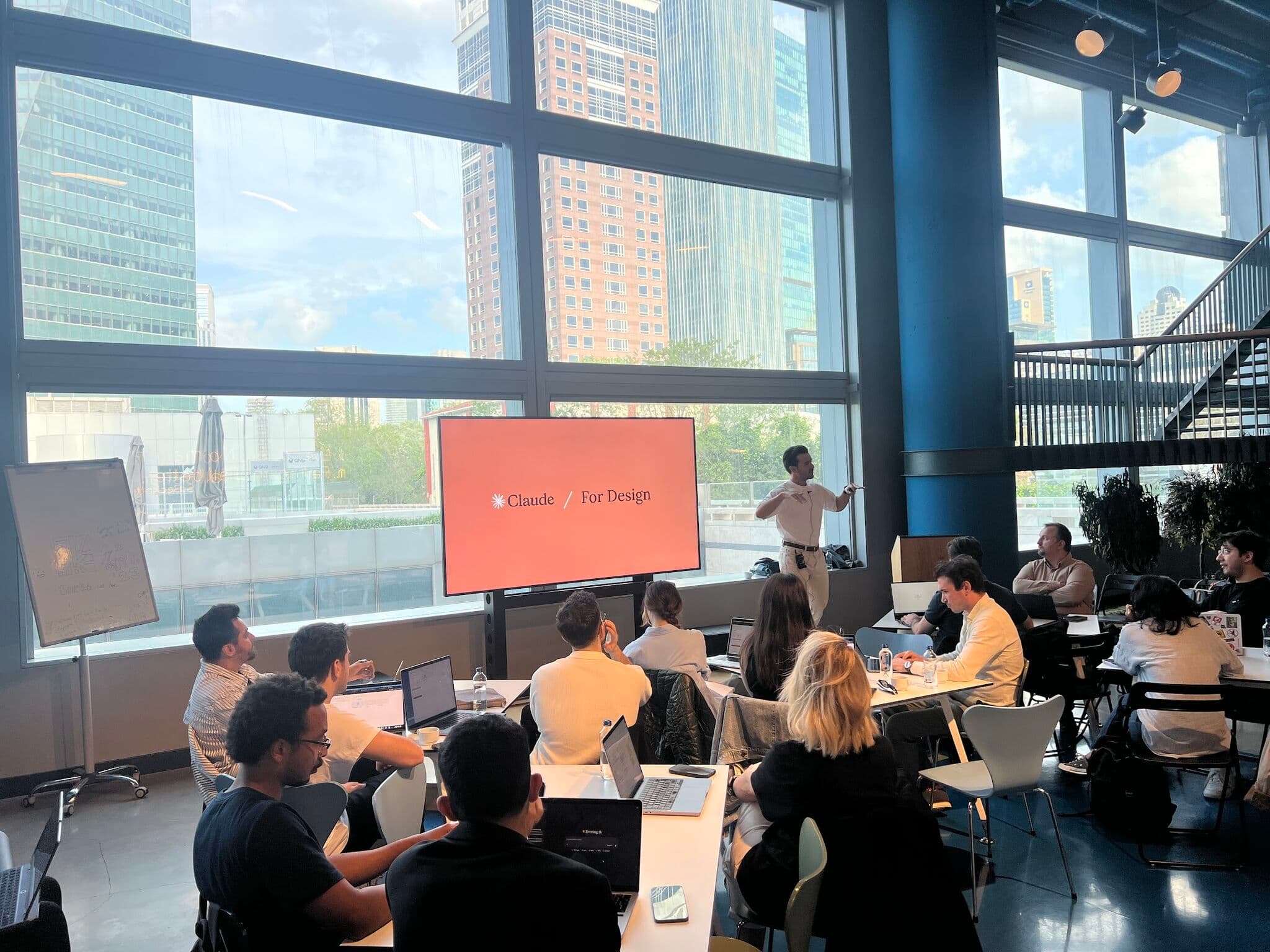
Beta Space Studio's Claude for Design workshop at QNBEYOND
Beta Space Studio's Claude for Design workshop at QNBEYONDBeta Space Studio

Companies don't buy "a day of training" from us.

They buy a permanent change in how their teams work with AI.

Why now?

AI is already inside your company. You just haven't set the rules for it yet.

Your people are using AI tools today, right now. They're doing it their own way, by trial and error, and usually with no sense of the risk it creates for the company. So waiting isn't a neutral choice. With every month that passes, methods learned the wrong way harden into habits, and those habits become the standard everyone else picks up. Correcting an entrenched habit always costs more than setting it up properly in the first place.

The money goes into tools. The change happens in people.

What we mean by AI transformation

A company gets real productivity out of AI not when it buys an expensive platform, but when its people are genuinely good with the desktop apps: Claude, ChatGPT, Gemini. When they can think alongside those tools across the folders and documents on their own computers, produce work with them, and hit the same standard every time, that is where the return shows up.

Why define it that way? Because that is where the work actually happens. Contracts, reports, presentations and emails all live in files on someone's computer. If AI never touches those files, it never touches the work. And why insist on output at a consistent standard? Because one impressive result is luck, not skill. The value to a company comes from getting that same quality from every employee, every time.

So the measure of transformation isn't a pilot project or a demo day. The measure is this:

on an ordinary Tuesday, how does an ordinary employee get an ordinary piece of work done with AI?

Two things have to be in place for that:

  1. 1People who are good with these tools and can think with them
  2. 2Data sources that are organized and protected enough for those tools to work on safely

Neither one works without the other. The most capable user in the building still hits a wall against scattered, unsecured data, and the tidiest data set in the world sits idle in a team that doesn't know what to do with it. Our three levels cover the first of these from end to end. For the second, we work separately on the systems side.


Level 01

AI Literacy

Get the fundamentals right. Bring everyone up to the same level.

AI Literacy training

Who it's for

Every white-collar employee. Anyone who wants AI in their daily work, whatever their department or seniority.

Format

1 day · On site at your office

Before the training we run a short pre-assessment of where participants are today and where they have the most to gain, then adapt the content to your team. The day answers your team's real needs instead of delivering a generic lecture.

Why start with the fundamentals?

Because how well someone uses a tool depends on the mental model they have of it. An employee who doesn't know how a large language model works ends up at one of two extremes. Either they trust the output blindly and carry hallucinations into their work without noticing, or they don't trust it at all and never get near what it can do. Both cost the company: one shows up as risk, the other as productivity left on the table. Someone who can explain how the model works, why it behaves the way it does and what causes a hallucination knows when to trust it and when to check it.

Why the whole company?

Because AI output doesn't stop at department lines. One report passed on without being checked, one file shared without knowing where the security line sits, and it becomes the whole company's problem. A single weak link is enough. There's a practical reason too: nothing after this scales without a shared vocabulary. If "Skills", "hallucination" and "context" mean different things to different people, good practice stays stuck with individuals instead of spreading.

This isn't a set of "AI is coming and it will change our jobs" talking points collected from social media. It goes into how large language models actually work, so that afterwards everyone uses every AI tool with a clearer head.

What's covered

  • 01Understand how the model reasons, so you can predict what it will and won't handle
  • 02Write prompts that give repeatable results rather than lucky ones
  • 03Pull solid insight out of long documents and large datasets in seconds
  • 04Spot hallucinations and put a verification step behind your output
  • 05Keep AI tools inside safe limits so company information stays protected
  • 06Know which model (Claude, GPT, Gemini) suits which kind of work
  • 07Pick up expert tips built around everyday white-collar routines

Outcome

The whole team uses the same vocabulary, understands the risks and works to a shared standard of productivity. That is the foundation the next two levels build on.

Level 02

AI Productivity

From chat window to colleague.

AI Productivity training

Who it's for

Professionals who lose hours to routine office work and want real output from AI. Especially teams carrying heavy document, email and reporting loads.

Format

1 day on site, or 2 half-days online

Why isn't asking questions enough?

Because typing a question into a chat window and reading the answer doesn't change the work. It gives you a helper standing next to the work. The output shifts from person to person, from day to day, from one version of a prompt to the next: good today, thin tomorrow. Quality at company scale comes from a defined standard, not from individual heroics. For the work itself to change, AI has to know the company's rules, reach its data and be able to touch its files. This training builds exactly those three layers:

01

Skills

The rules you teach Claude: your house style, your email templates, your report formats. Define them once and the output stays consistent every time. The standard no longer lives in one person's head, it lives in the system, and a new hire produces work at the company's quality from day one.

02

MCP

The tools Claude connects to: Gmail, Drive, Slack, Outlook, Teams, SharePoint. It reaches them directly, pulls the data and acts on it. Copy and paste drops out of the process, and the AI works with the real context of the job.

03

Cowork

Claude opening and editing files on your own computer. It opens Word, produces PDFs, creates folders. This is where it stops being a tool that makes suggestions and becomes a colleague that finishes the job.

With all three working together, Claude stops being a one-off chat window and becomes a personal office assistant. And the gain compounds: the hours you get back this week come back again every week after that, and once every employee has an assistant of their own, the team's capacity is permanently larger.

Example scenario

Take the details of 50 people from a spreadsheet, drop them into a Word template and produce 50 personalized PDFs. By hand: a full day. With Claude: two minutes. And all 50 come out to the same standard.

What's covered

  • 01Defining rules for your own line of work with Skills
  • 02Connecting Gmail, Drive, Slack, Outlook, Teams and SharePoint through MCP
  • 03Automating document production with Cowork
  • 04Producing Word, PowerPoint and PDF files at professional quality
  • 05Setting up your own agent loops: hand the work over, review the result
  • 06The finer points of building your own Skills

Outcome

Repetitive office work turns into automation, and every employee ends up with an AI assistant of their own. By the end of the day the team sees Claude as a working partner inside their routine rather than a chat window. The shift is from an employee who asks AI questions to an employee who hands the work over and checks the result.

Participant feedback: in post-training surveys, 100% of participants said they would use at least one thing they had learned in their work that same week.

Level 03

AI Builder

From no code at all to a working product.

AI Builder training

Who it's for

Professionals who want to build an internal tool, a dashboard, an MVP or their own digital product, and who want to use Claude Code without a software background.

Why teach people who aren't developers to build?

Because in every company the demand for internal tools runs well ahead of what the software team can deliver. No amount of hiring closes that gap. Even simple requests sit for weeks, and most ideas die before they ever reach the backlog. Meanwhile the person who lives with the problem every day is the one who knows best what the fix should look like. When they can build it themselves instead of describing it to someone else, nothing gets lost in translation and nothing sits in a queue.

Why software literacy rather than coding?

Because in the age of Claude Code the bottleneck isn't syntax, it's judgment. How does a website on the internet actually work? Where does the data sit? How do you decide whether something is safe? What does a sound architecture look like? Someone who understands all that doesn't have to write the code line by line. They can direct it. That's exactly our principle: we don't learn to write code, we learn to manage it.

That understanding brings one more benefit with it: a shared language with the IT department. When the people building their own tools can describe what they need and what they've built in the right terms, the ability to build spreads through the company while security and governance stay intact. The goal isn't to work around IT. It's to turn the queue in front of IT into builders who can talk to IT.

Program: 2 modules · 2 days

  • Module 011 day

    Software Literacy and Your First Website

    Front-end, back-end and hosting; the basics of HTML, CSS and JavaScript; software architecture and how languages get chosen; version control and publishing with Git and GitHub. By the end of the day your first website is live.

  • Module 021 day

    A Full-Stack Web App with Claude Code

    Modern interfaces with React, Next.js and Tailwind; deploying on Vercel and connecting a domain; the backend, API and database layers; user login and session handling; how to build 10x faster with Claude Code. By the end of the day you have a complete application, interface, backend, database and login included, running live.

Outcome

You finish with a working software product built with Claude Code, without knowing how to program. And more importantly: the next time an internal tool is needed, your first question isn't "who can build this?" but "how do I build it?"

Roadmap: the order we follow

We suggest the same order to every company, because each level rests on the one before it. You can't hand work over to a model you don't understand, and you can't know what to build until you've learned to hand work over. When a company skips a step, the training stays an event: the day goes well and nothing changes afterwards.

  1. 1

    AI Literacy · the whole company.

    Everyone starts from the same place, the risks are clear and a shared language is in place. We almost always start here, because the upper floors don't hold without the foundation.

  2. 2

    AI Productivity · selected teams.

    We start with the teams carrying the heaviest document and communication load, because the gain scales with volume: wherever the most repetitive work sits, that's where the most time comes back.

  3. 3

    AI Builder · the people ready to build.

    The first two levels double as a diagnosis. Who will genuinely move over to the building side only becomes clear there. Builder is then planned for that group specifically, so the investment rests on what we've seen rather than on a guess.

Every participant receives a certificate of attendance at the end of the program, verifiable at betaspacestudio.com/verify. What they've learned becomes a documented asset, for them and for the company.

Why Beta Space Studio?

The real question behind any training budget is simple: will this day actually change behavior? Our answer rests on two things.

Onat VuralSaid Sürücü

Instructors who build for a living.

This field moves in monthly cycles, and last year's curriculum is already out of date. Onat Vural and Said Sürücü are Turkey's two Claude Ambassadors, and everything they teach is something they use in their own work every day. You get today's practice, not last year's knowledge.

Learning by doing.

We don't lecture. Participants work on their own real tasks from the first minute, and the examples are adapted to your industry. Behavior changes by doing the work, not by listening to someone describe it, and whatever gets built during the training is still running at the same desk the next morning.

Let's get started

For us, the first conversation isn't a sales call. It's the first step of the diagnosis. Together we go through how your team is set up, how they're using AI today and where the biggest gains are, and then we put together a program and a proposal built around that.

Get in touch
Enterprise AI Training | Beta Space Studio | Beta Space Studio